Capturing Institutional Knowledge: Do You Have a Plan?
Institutional knowledge is a major asset for manufacturing operations. Here’s why you need a plan to capture it.

By
Garth Coleman
・
3
Min READ
July 6, 2023
A new hire arrives on the floor with no manufacturing background, no familiarity with your product, and in many cases no fluency in the language your documentation is written in. You have weeks to bring them to competence on a process that took the person they are replacing years to master. The methods available to you are a classroom, a binder, and an experienced worker who has to stop producing in order to teach.
That arithmetic stopped working. The manufacturing workforce is turning over faster than knowledge can be handed down person to person, and training methods built for a stable, long-tenured workforce were never designed for this rate of churn.
Better knowledge transfer is what decides whether a new hire becomes productive or becomes a resignation. This article looks at where traditional training falls short for the workforce you are actually hiring, and at how interactive digital work instructions change onboarding, upskilling, and retention.
Traditional training methods in manufacturing organizations typically involve either job-shadowing, where a learner observes a more experienced worker, or classroom scenarios which depend on passive learning and text-heavy manuals and documents.
Job shadowing is the richer experience for the learner, but it has two important drawbacks. First, it takes experienced workers away from their principal and most productive responsibilities. Second, it risks the learner absorbing non-standard workarounds that have evolved among the experienced workforce.

The challenges associated with classroom learning are familiar to most of us. It is difficult to gauge attention and knowledge retention in a room full of trainees, particularly when there is no hands-on element to the training. Younger generations of workers are also less comfortable with textbooks and written learning, especially where there is a diversity of language skills.
The experience of the new generation of workers is the consideration that matters most here. Recruiting, training, and retaining a quality workforce is one of the hardest problems in manufacturing right now. Deloitte and The Manufacturing Institute project that manufacturing will need 3.8 million additional workers between 2024 and 2033, with as many as 1.9 million of those roles going unfilled. The demographics behind that shortfall are worth understanding on their own terms. The workers who are available are younger, digital-native, and include a substantial cohort who do not speak English as a first language. Employees who are not trained effectively make more mistakes, and they are more likely to leave, which writes off the investment made to hire and educate them.
So an ideal training paradigm for U.S. manufacturing today is one that:
Success in manufacturing today depends on your ability to modernize your training methods. That means making them accessible, delivering clarity, and providing experiential learning without disrupting operations.
Cue interactive digital work instructions.
Interactive digital work instructions change how knowledge is delivered and consumed. They give learners greater autonomy and a non-disruptive virtual interactive experience, which accelerates knowledge transfer and improves retention, leading to faster task completion and fewer errors.
They also speak to the content-consumption preferences of the next generation of manufacturing workers.
Millennials and Gen Z now make up the majority of the workforce, and they arrived expecting the tools at work to resemble the tools they use everywhere else. Training methods that ignore this cost you at both ends, in the candidates who decline and the hires who leave.
Roughly seven in ten younger workers weigh how far an organization has embraced technology and innovation when choosing an employer. A LinkedIn study found that 94% of employees would stay at a company longer if it invested in their learning and development.
Manufacturers who deploy interactive digital work instructions signal that they understand what the younger workforce expects from a workplace. And where those instructions are in use across the organization, employees learn processes through the same technology they will use once they are operational, rather than through a parallel training system they abandon on day one.
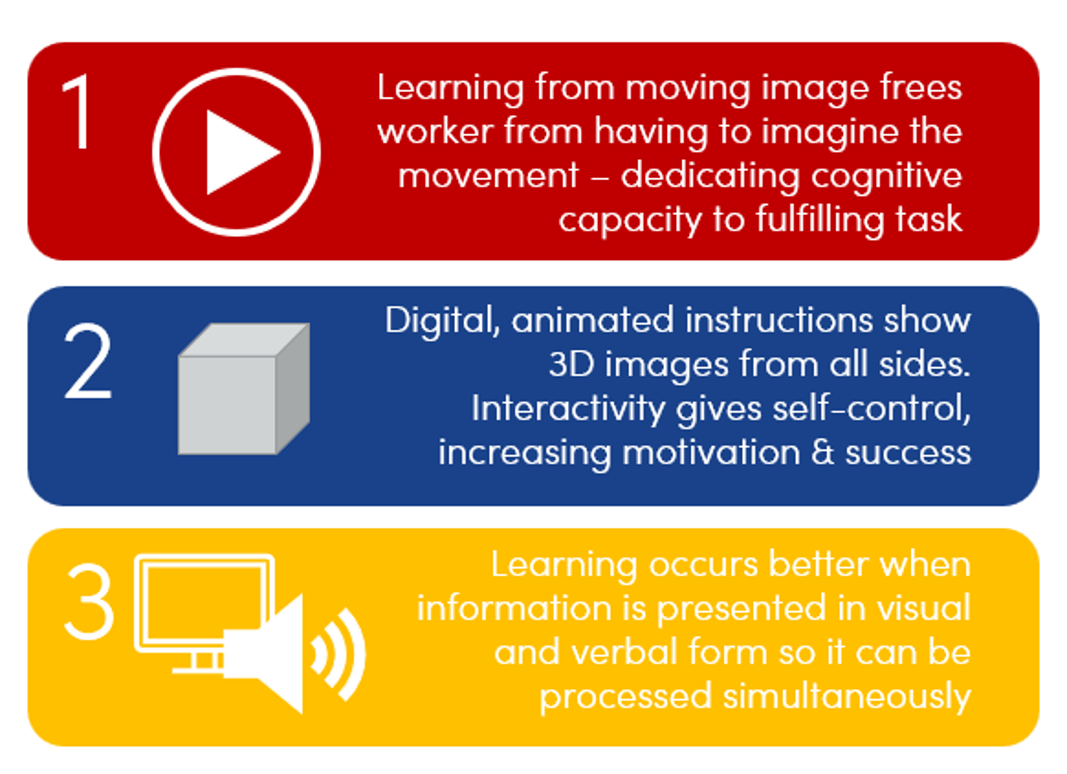
One-to-one, on-the-job instruction is a highly effective way of learning, and workers prefer it to classroom instruction and textbooks. It is also disruptive and time-consuming. Interactive digital work instructions replicate the hands-on experience without draining the resource that makes it work.
Learning improves when information arrives in a combination of visual and audio formats that can be processed simultaneously. Compared with paper-based instructions or in-class learning, interactive digital instructions increase the user's ability to engage with a task, which produces quicker comprehension, faster training time, and fewer errors on the shop floor.
Workers access content that lets them learn through precise 3D visualizations, narrated animation, and interactive models. They view objects from any angle and control what they are looking at, which increases both success and motivation. This style of learning reduces cognitive load and lets the worker focus on the relevant aspects of a complex task, clearing capacity for long-term memory.
Training methods should let everyone understand faster, with greater clarity, in less time. In an increasingly diverse and multinational work environment, communicating critical information and creating training content becomes significantly more complex, and traditional methods allow little flexibility for non-native English speakers.
In our research, 81% of manufacturing employees aged 25 to 34 found text-heavy documentation challenging, given the diversity of first languages and reading skills within their organization. Only 66% of those in the 45 to 54 age group agreed, which shows workforce attitudes shifting by generation.
Interactive digital work instructions carry meaning visually. They limit the use of text and lead with interactive 3D models, animations, and information mapping, so comprehension depends less on reading proficiency in any single language. That widens the pool of people who can do the work, which for most manufacturers is the point.
Not all digital work instructions are equal. For your organization to get the full benefit of shifting to interactive digital work instructions as a primary training method, look for:
Our guide on how to implement interactive work instructions in 10 steps covers the authoring and deployment lifecycle in detail, from initial assessment through pilot to continuous improvement.
The value of interactive digital work instructions does not stop at better training. The same instruction that teaches a new hire is the instruction an experienced worker follows during production, which means the training material and the working document stop being two separate artifacts maintained by two separate processes.
That is what on-the-job training looks like when the instruction is built for it. New hires get full detail. Experienced workers get what changed. Nobody maintains a training deck that drifts out of step with the procedure it is supposed to describe.
You can keep reading about this, or you can watch it run on a process you already train people on. The second settles it faster.
In Envision Creator, with Evie doing the heavy lifting, the training material you have today becomes an interactive instruction in a fraction of the time it took to write the original.
Request a Demo, and bring the process that takes your new hires the longest to learn.
Garth Coleman is CEO of Canvas Envision, where he is changing how manufacturers capture, share, and execute the knowledge their best people carry. He brings nearly three decades in enterprise software spanning CAD, Product Lifecycle Management (PLM), and 3D communication, including senior leadership at Dassault Systèmes.
Book a demo with your own CAD data. Most teams are authoring in minutes.