

Your AI for manufacturing work instructions.

Evie turns CAD data, PDFs, videos, and decades of expertise into structured, interactive work instructions in minutes. It's an agentic AI built into Envision Creator, with sub-agents trained on the Envision Create SDK. The result is content that fits the way work actually gets done on your floor.

Request a Demo
Arrow
Request a Demo
Get Pricing
Get Pricing
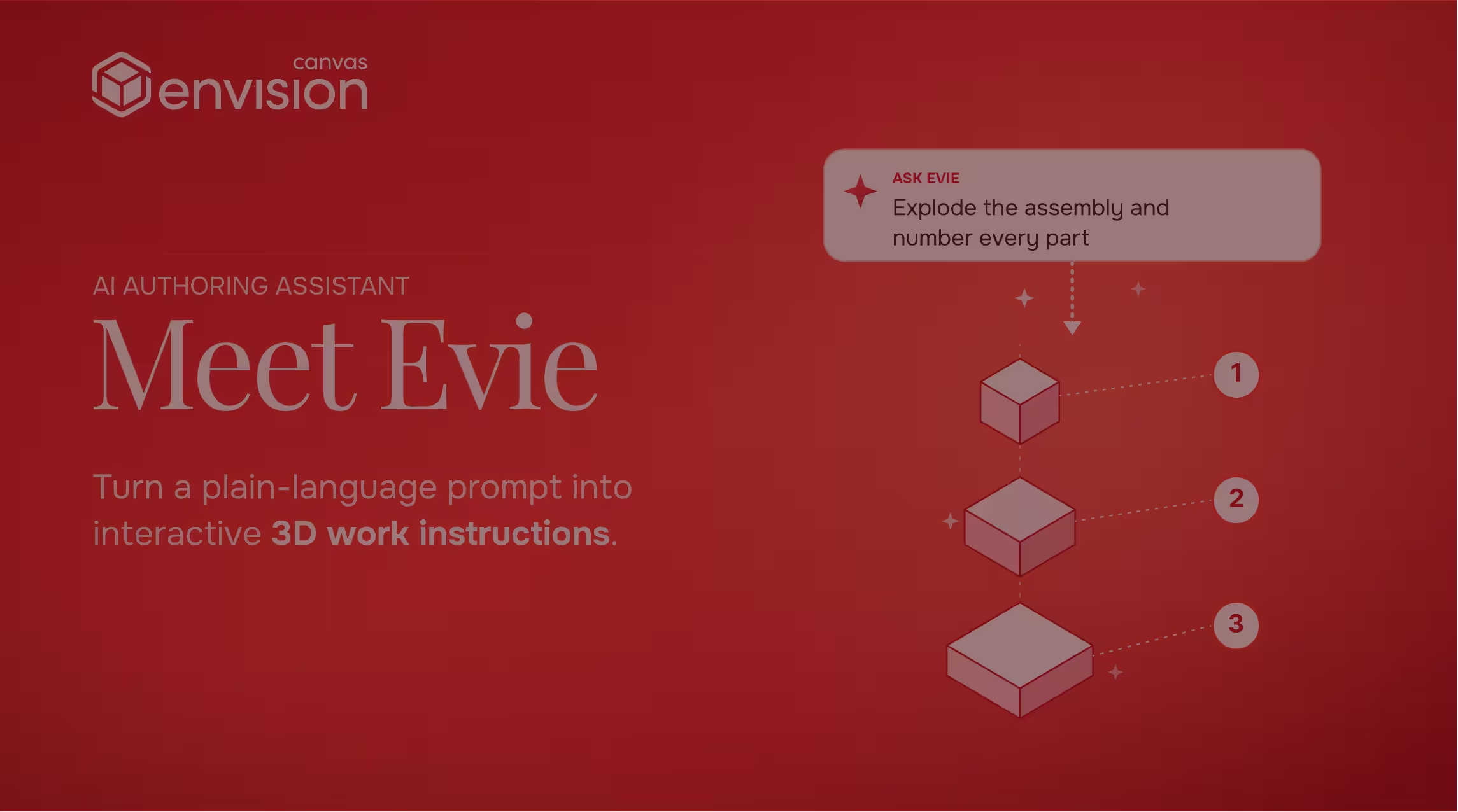
Envision Canvas AI assistant Meet Evie turns plain-language prompts into interactive 3D work instructions.
Watch a 70S demo
Play
[ TRUSTED BY WORLD-CLASS MANUFACTURERS ]
Zipline
Marvin Engineering Company logo
Azenta Life Sciences
Otis
[ How It Works ]

Drop in your content. Evie does the rest.

Evie is built into Envision Creator, trained specifically to author manufacturing work instructions. Sub-agents trained on the Envision Create SDK label parts, sequence assemblies, generate exploded views, revise step content, and update documents in batch. The output is structured authoring you can use right away.

Step [01]

Bring source content

Bring CAD data, PDFs, videos, expert demonstrations, scanned manuals, or content from another platform. Evie turns it into work-instruction inputs.

Step [02]

Engage with Evie

AI Assistant for ad-hoc tasks like batch operations, 3D manipulation, and quick drafts. Agent Workflows for repeatable transformations like PDF, video, or 3D CAD assembly conversion.

Step [03]

Refine and publish

Following your templates, guardrails, and standards, Evie produces in minutes what would take a human author hours or days. You review, refine, and publish.

[ Benefits ]

Hours of work, in minutes.

Author at AI speed

Evie generates exploded views, labels parts, sequences assemblies, and updates entire documents in seconds. Hours of authoring work compress into minutes, and you stay in control while Evie does the heavy lifting.

Keep up with engineering

Evie helps you handle engineering changes in batch, revising callouts, step text, exploded views, animations, and sequence narration across all the affected work instructions. Updates that used to take days of manual rework take minutes.

Reuse what you already have

Hand Evie a PDF, video, scanned manual, expert demonstration, screenshot, or 3D CAD model, and it becomes a structured work instruction. Decades of legacy investment and tribal knowledge become deployable content.

[ Features ]

AI content automation at your service.

Agent Workflow
 ]

PDF to Work Instruction Agent

Converts service manuals, SOPs, and procedural PDFs into structured interactive instructions. Evie identifies procedure boundaries, extracts step content, proposes structure, and produces a draft.

Agent Workflow
 ]

Video to Work Instruction Agent

Converts instructional video and procedure recordings into sequenced step-by-step instructions. Evie identifies the procedure's logical steps, selects key frames, and proposes the step structure.

Agent Workflow
 ]

3D Assembly Instruction Agent

Builds an assembly instruction from a 3D CAD model. Evie reasons about the geometry, classifies parts, proposes the assembly order, and generates a sequenced instruction with exploded views, animations, and labels.

Custom Workflows
 ]

Custom Evie AI Agents

Build your own Agent Workflows in the AI Agent Manager for organization-specific document standards, content sources, and process patterns. Custom agents share the same underlying model and infrastructure as the named agents.

Templates
 ]

Guardrails for your AI

Templates carry guidance that tells Evie exactly what content to put where. Authors and Evie work from the same template, so the output matches your standards whether the work is human-authored or AI-authored.

AI Assistant
 ]

AI content automation

Chains multiple operations into a single sequence. Camera positioning, part isolation, labels, step text, and document-wide formatting all run as one prompt across every page or every document.

AI Assistant
 ]

3D model understanding

Reads assembly hierarchy, part metadata, and spatial relationships directly from the 3D model. "Find all fasteners," or "explode the focus assembly and label each component" are one-prompt examples.

AI Assistant
 ]

Engineering change handling

Cascades engineering changes across every affected work instruction in batch, including callouts, step text, exploded views, part visibilities, and animations.

[ Observed Benchmarks ]

Time on task, before and after Evie.

Evie's acceleration has been measured against real source content from Canvas Envision customers and internal testing. The benchmarks below are observed times for specific authoring tasks. Your own numbers will depend on the source content, but the order-of-magnitude compression is consistent.

Task

TRADITIONAL
WITH EVIE

Convert 20-page PDF manual

6 hours
<10 minutes

Create 50-part assembly instruction

2 days
Under an hour

Generate exploded views with labels

25 minutes
30 seconds

Update header templates across 100 docs

30 minutes
10 seconds

OBSERVED BENCHMARKS WHERE MEASURED, NOT PROMISES. YOUR NUMBERS WILL DEPEND ON THE SOURCE CONTENT.

[ AI trained for manufacturing ]

AI trained for work instructions, on top of the best foundation models.

Evie is an agentic orchestration layer that calls on multiple AIs and large language models, with sub-agents that specialize in distinct parts of the work. The orchestration layer selects the best model for each task and continuously optimizes that selection as foundation-model capabilities evolve.

Where general-purpose AI does the job well, like content interpretation, summarization, and reasoning over text and media, Evie uses it. Where the work requires specific knowledge of how Envision authors content, Evie's sub-agents are trained on the Envision Create SDK, the same authoring API the platform exposes for programmatic content generation. Those sub-agents produce structured authoring output that fits the platform's data model, including steps, visuals, content references, and the relationships and metadata that keep work instructions governed.

Evie also reasons about manufacturing: bills of materials, assembly sequences, CAD geometry, product structures, exploded view logic, and template layouts. It selects the right page layout based on the available content. It understands what a part is, how an assembly comes together, and how to sequence the work.

The result is AI that gives you what an LLM is good at, combined with manufacturing-specific reasoning, deployed into Envision Creator, and constantly improving as foundation models do.
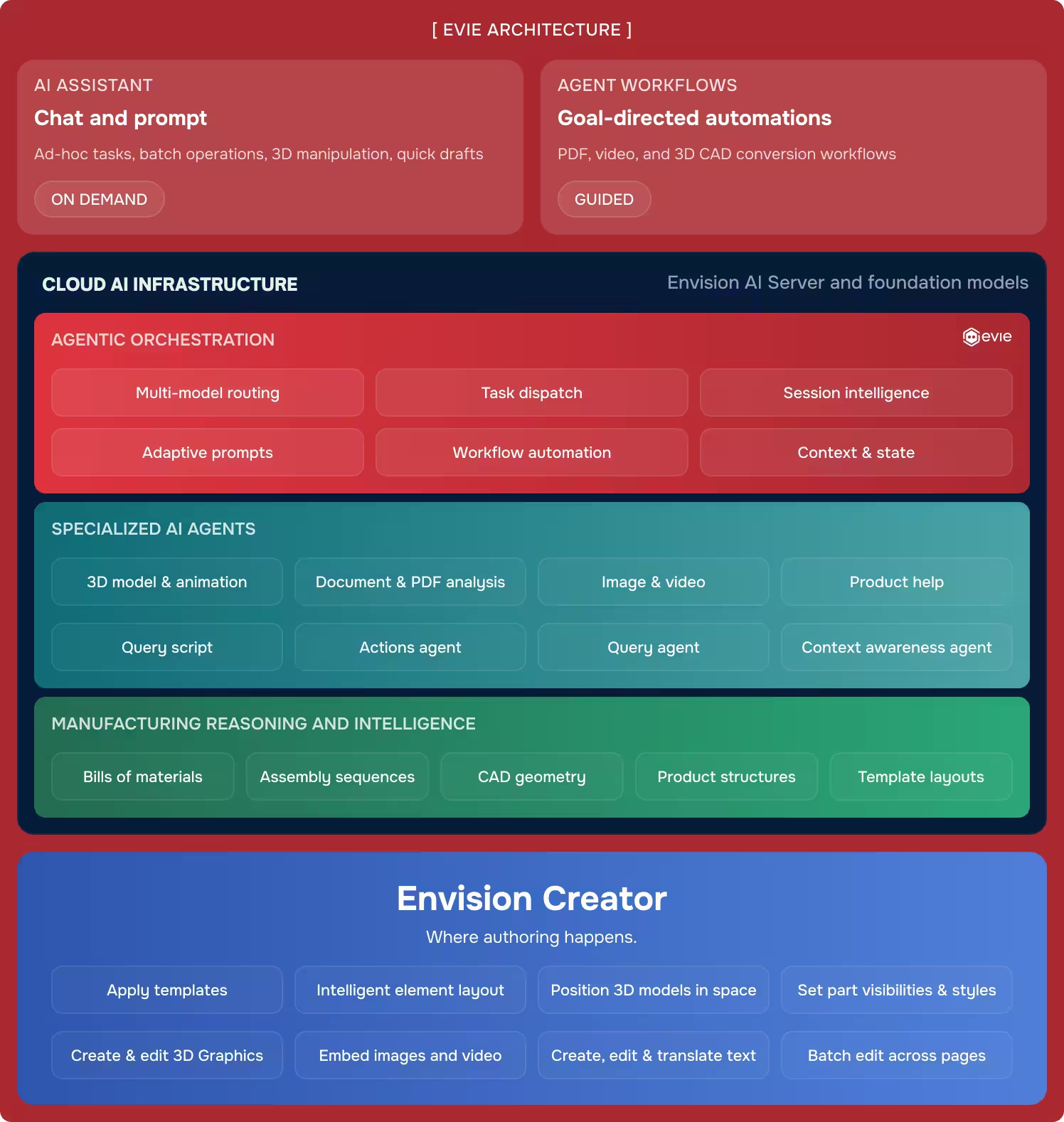

Diagram showing Evie architecture with AI assistant, agent workflows, cloud AI layers, and Envision Creator features.
[ FAQs ]

Frequently Asked Questions.

Still wondering? We're happy to talk through your specific assembly use case.

REQUEST A DEMO
REQUEST A DEMO

What is Evie?

Canvas Envision’s AI for manufacturing work instructions. Evie is an agentic AI inside Envision Creator. It works with you as your AI assistant on demand, and runs guided Agent Workflows for repeatable authoring tasks. Sub-agents that produce authoring output are trained on the Envision Create SDK.

What’s the difference between AI Assistant and Agent Workflows?

With AI Assistant, you prompt Evie. You ask for a draft, a batch operation, a 3D manipulation, and Evie executes. With Agent Workflows, Evie prompts you. The workflow embeds best practices and structural decisions, then guides you through producing a consistent, high-quality result on a specific kind of source content (a PDF, a video, a 3D CAD assembly, or your own custom workflow built in the AI Agent Manager).

What can Evie convert into work instructions?

PDFs, videos, 3D CAD assemblies, screenshots, scanned manuals, and existing documentation in most common formats. The three named Agent Workflows cover the most common sources today; Custom Evie AI Agents extend the pattern to your organization’s specific content.

Can Canvas Envision generate SOPs with AI?

Yes. With Envision Creator and Evie, you can take your engineering data, CAD models, and existing content and generate structured documents from them. Where Canvas Envision really focuses is on the next step: moving SOPs and traditional documents into sequential, interactive execution on the shop floor. See Envision Creator for the authoring side and Envision Operator for execution.

Can Evie turn an SOP into an interactive work instruction?

Yes, absolutely. Canvas Envision starts where the SOP ends. Hand Evie an SOP and Evie converts it into a sequential, step-by-step interactive instruction your workers execute at the point of work, with adaptive detail by skill level, embedded data capture, and feedback that flows back to engineering. The SOP becomes the work, not a document next to it.

Does Evie do AI content automation?

Yes. Evie automates the heaviest content work in manufacturing: batch operations across documents, structured conversion of legacy PDFs, training videos, and 3D CAD assemblies into interactive instructions, and Custom Evie AI Agents that embed your standards into every output. See Use Cases: Content Transformation for the full picture.

What foundation models does Evie use?

Evie’s orchestration uses multiple foundation-model providers (Google Gemini and Anthropic) and selects the best model for each task. The selection is continuously optimized as capabilities and costs evolve. See the Security page for data-handling detail per provider.

Is my data used to train Evie?

No. Customer production data is not used to train Evie or any of the underlying foundation models. Evie’s authoring sub-agents are trained on the Envision Create SDK, not on customer data. See the Security page.

Do I need 3D CAD models to use Evie?

No. Evie works with PDFs, videos, images, and existing documentation. The 3D Assembly Instruction workflow uses CAD; the others don’t require it.

How does Evie handle engineering changes?

When Canvas Envision is connected to your PLM, work instructions become governed objects tied to engineering data, so your PLM can run impact analysis on them. Envision Creator brings the updated geometry into the affected instructions, and Evie helps you revise the rest in batch, including callouts, step text, exploded views, animations, and sequence narration. After your approval, the latest version flows to Envision Operator immediately.

Where does Evie run?

Evie’s authoring sub-agents are trained on the Envision Create SDK, so Evie runs inside Envision Creator, where the authoring happens. Evie does not run inside Envision Operator.

How fast is Evie?

Authoring tasks that took hours or days take minutes. Engineering change incorporation that took days takes minutes. See the table above for representative benchmarks.

Can my organization disable AI features?

Yes. AI capabilities are configurable at the organization level. Individual users cannot override the configuration.

Can Evie work alongside our existing AI investments?

Evie is the vertical AI for manufacturing work instructions and complements broader AI investments. For sovereign or regulated workloads, see the Security page.

[ Explore further ]

The rest of the platform.

Canvas Envision Creator icon

Author the instructions Envision Operator delivers.

Canvas Operator SDK icon

Interactive on-device delivery to the people doing the work.

Canvas Envision Connector icon

APIs, webhooks, and developer tools to extend the platform.

Canvas Envision SDK icon

Pre-built PLM and MES integrations: Aras, Autodesk Vault, Infor, SSI Shipbuilding PLM, SAIC ReadyOne, 42Q, Rockwell Plex.

Bring your content.

See what Evie does.

Request a demo. Bring a PDF, a video, or a 3D assembly. See what Evie does with it.

Request a Demo
Arrow
Request a Demo
Request Pricing
Request Pricing
<