

Control every work instruction from first draft to release.

Envision Portal keeps your work instructions organized, versioned, and secure, with review built in and access set by Team. Add Envision Operator to deliver published instructions to the floor and bring the data your workers capture into Envision Portal.

Request a Demo
Arrow
Request a Demo
Request Pricing
Request Pricing
[ TRUSTED BY WORLD-CLASS MANUFACTURERS ]
Marvin Engineering Company logo
Otis
[ Why Envision Portal ]

Manufacturing document management built for work instructions.

Work instructions often live in shared drives, PDF folders, and email attachments, where nobody can say for certain which version is current or who changed it last. When the floor runs an old revision, the cost shows up as rework, scrap, and audit findings. Envision Portal gives every Envision Creator document a controlled home in the cloud, with status and version on every file, built-in review, and access by Team. With Envision Operator, the data your workers capture comes back to Envision Portal, where Admins query it, export it, and send it to other systems.

[ How It Works ]

Organize, control, release.

Step [01]

Organize

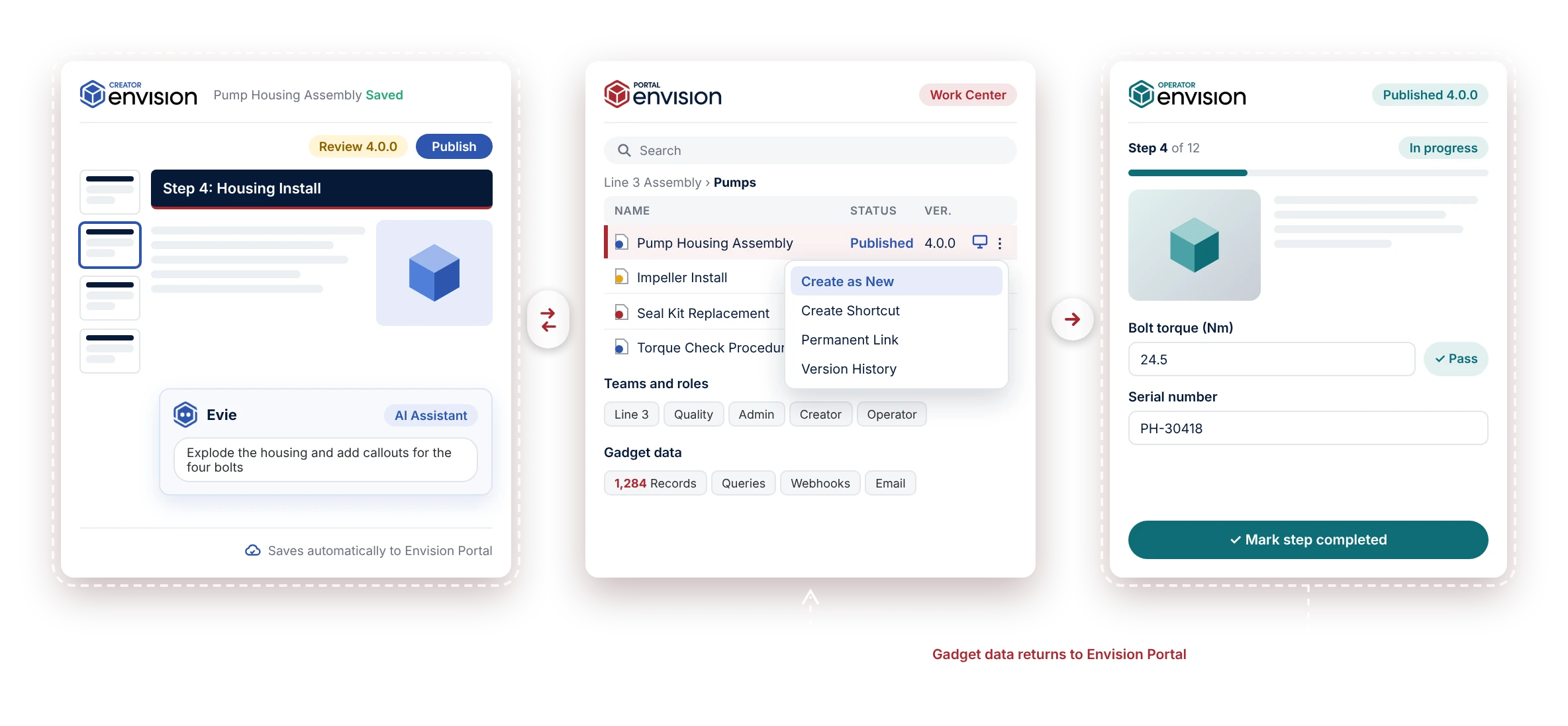
Set up Work Centers for each program, line, or site, and organize your instructions in folders. Authors start new instructions from your published templates, and search finds any file, folder, or teammate in the workspace.

Step [02]

Control

Everyone signs in securely. Admins add people to Teams and give each Team access to the Work Centers it needs. Admins manage and Creators author. With Envision Operator, Operators view instructions and capture data. Files lock automatically while someone edits them.

Step [03]

Release

Envision Creator saves every change to Envision Portal automatically, and Creators move each version from draft to review to published. Export a published version as a PDF or images to use anywhere. With Envision Operator, the floor works from an interactive digital version that stays current with what you've published, and the gadget data workers capture comes back to Envision Portal.

Request a Demo
Arrow
Request a Demo
Request Pricing
Request Pricing
[ Benefits ]

Start from your standard, release with confidence, put floor data to work.

Every instruction starts from your standard

Templates live in the Templates Center and appear on the Envision Creator home screen. Every new instruction starts from the layout and structure your team has approved, and search finds any file, folder, or teammate in seconds.

Every release is reviewed and recorded

Nothing is published until a Creator promotes it. Send a document for review, and the people or Teams you name are notified and comment directly in it. Version History keeps every snapshot to compare or restore. With Envision Operator, a new version reaches the floor when it's published, or when you choose with a permanent link.

[ With Envision Operator ]

Floor data goes where it's needed

Each gadget data record carries the file, version, user, and time it was captured. Build queries, export the results, push them to your other systems with webhooks, or schedule a summary email.

[ Features ]

Everything you need to run a library of work instructions.

Work Centers and Teams

Organize instructions by program, line, or site. Grant access by Team, with Admin and Creator roles, plus Operator roles with Envision Operator. Keep a Work Center private, or make it public and share single instructions by link through Envision Operator.

Draft, review, and publish

Any Creator moves a version from draft to review to published inside Envision Creator. Send a document for review to named people or whole Teams, who are notified and comment in the document with @mentions. Version History keeps snapshots you can compare and restore.

[ 
With Envision Operator
 ]

Control when a new version goes live

Envision Operator picks up a new version as soon as a Creator publishes it. When you need a controlled changeover, use a permanent link. It holds the floor on the current version until you deliberately load the new one.

[ 
With Envision Operator
 ]

Gadget data, queried and connected

Explore every gadget data record, save queries, and export to CSV. Webhooks push new and updated records to third-party systems, and scheduled emails send summaries on the cadence you set.

[ Part of every edition ]
Envision Portal

Included in every Canvas Envision edition.

Envision Portal comes with Canvas Envision. With Envision Core, your authors get the full workspace, with Work Centers, Teams, review and release, Version History, and the Templates Center. With Envision Pro, Envision Operator adds the floor, which runs on the instructions you release there. Envision Portal lives in the Canvas Envision cloud and works alongside your Product Lifecycle Management (PLM) and Manufacturing Execution System (MES). With Envision Connector, your instructions are also governed objects in your PLM, part of the same revision-controlled product record as the engineering data used to build them.

Explore the platform
Arrow
Explore the platform
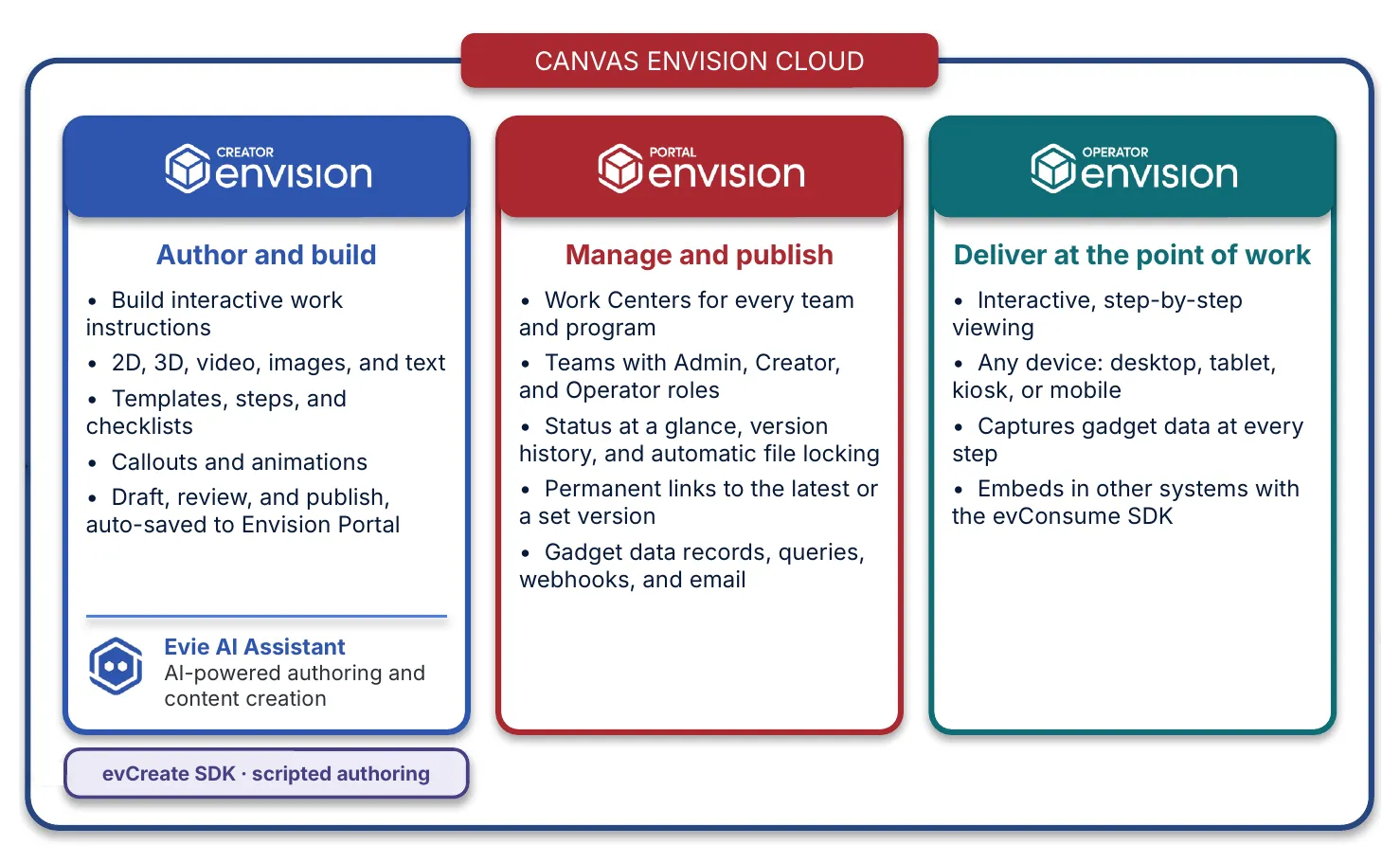
Envision Creator, Envision Portal, and Envision Operator in the Canvas Envision cloud
[ FAQs ]

Frequently Asked Questions.

Still wondering? We're happy to talk through how your team manages work instructions today.

Contact Us
Contact Us

What is Envision Portal?

Envision Portal is the work instruction management system for Canvas Envision. It stores, organizes, controls, and publishes the work instructions you author in Envision Creator, and it collects the gadget data your workers capture on the floor. It runs in the browser, so there's nothing to install.

Which editions include Envision Portal?

Both. With Envision Core, your authors get Work Centers, Teams, automatic saving, review and release, Version History, and the Templates Center, and they export published versions as a PDF or images to use anywhere. Envision Pro adds Envision Operator, which brings interactive delivery to the floor, Operator roles, permanent links, and gadget data.

What's the difference between a workspace and a Work Center?

Your organization has one workspace. Inside it, Work Centers hold your instructions in folders, organized however you run the business, by program, line, or site. Each Team gets access to the Work Centers it needs.

How is access controlled?

Everyone signs in securely, with SSO and MFA available. Admins assign people to Teams, and each Team can reach one or more Work Centers. People see only the Work Centers their Teams can access.

What roles are there?

Admins manage Work Centers, Teams, and members. Creators author and manage instructions. With Envision Operator, Operators view instructions and capture data.

How do versions work?

Envision Creator saves every change to Envision Portal automatically. Creators move each version from draft to review to published, and status shows at a glance in Envision Portal. Drafts and documents in review open for editing or viewing. Create as New starts the next version of a published document in Envision Creator.

Who can publish?

Any Creator. A Creator can send a document for review first, naming individual reviewers or whole Teams, who are notified and comment directly in the document.

[ Explore further ]

The rest of the platform.

Canvas Envision Creator icon

Work instruction authoring from 3D CAD, PDFs, and video, published as documents or interactive instructions.

Canvas Envision Evie icon

Canvas Envision's AI for manufacturing work instructions.

Canvas Operator SDK icon

Interactive on-device delivery to the people doing the work.

Canvas Envision Connector icon

Pre-built PLM and MES integrations: Aras, Autodesk Vault, Infor, SSI Shipbuilding PLM, SAIC ReadyOne, 42Q, Rockwell Plex.

Canvas Envision SDK icon

APIs, webhooks, and developer tools to extend the platform.

Put every work instruction under control.

Request a demo and see your instructions organized, released, and connected.

Request a Demo
Arrow
Request a Demo
Request Pricing
Request Pricing