

Author work instructions from your CAD data.

Envision Creator is the heart of authoring on the Visual Execution Platform. Engineers, technical writers, and manufacturing planners turn 3D models, PDFs, and legacy documentation into structured visual work instructions in minutes, with no IT background or CAD expertise needed. If you can use PowerPoint, you can use Envision Creator.

Start Authoring
$167/month
Arrow
Start Authoring
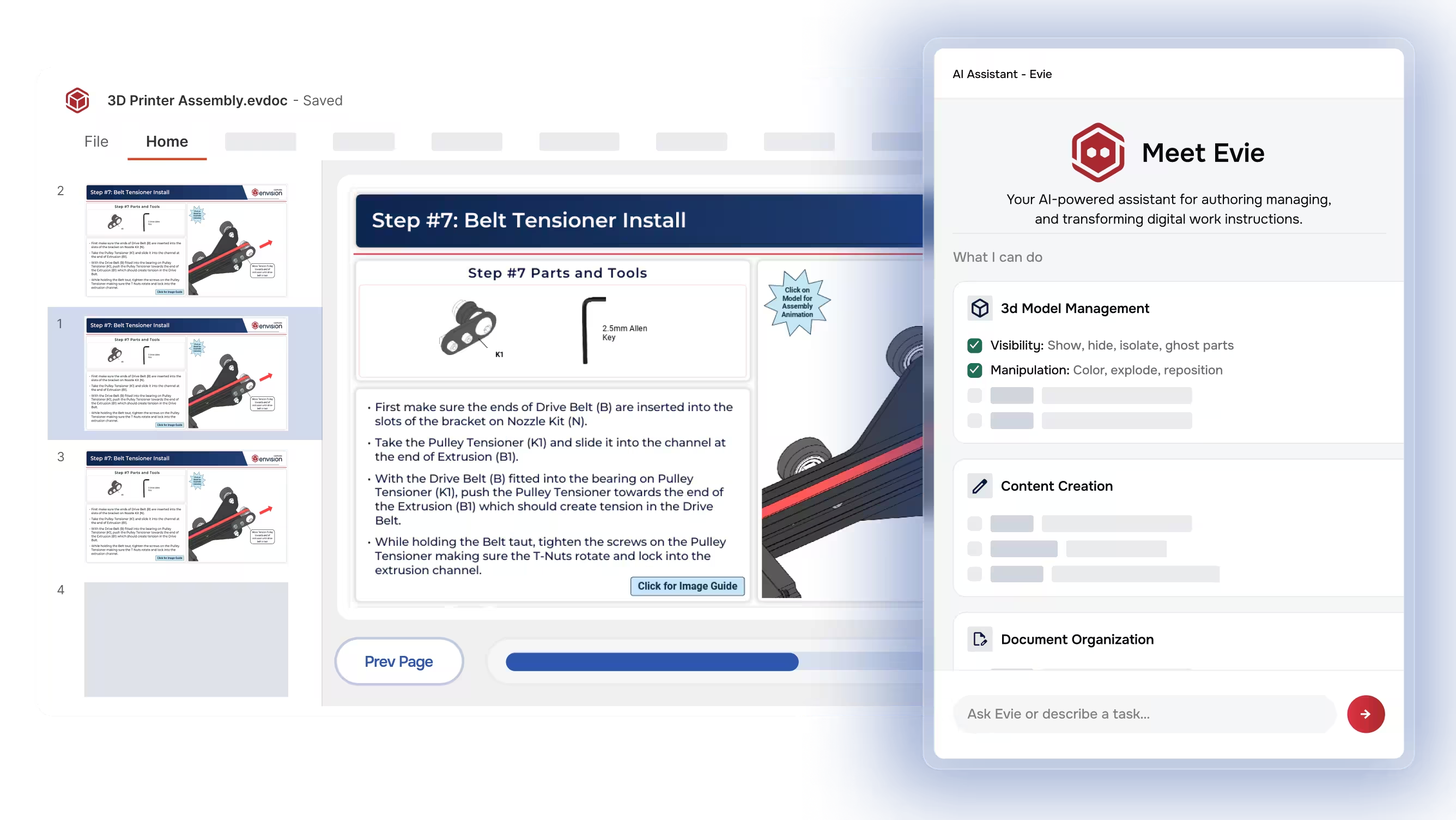
Software screen showing 3D printer belt tensioner installation instructions and AI assistant named Evie.
[ TRUSTED BY WORLD-CLASS MANUFACTURERS ]
Zipline
Marvin Engineering Company logo
Azenta Life Sciences
Otis
[ Why Envision Creator ]

Eliminate the burden of authoring.

The knowledge workers need lives in the heads of your engineers and process planners. Getting it out as visual, accurate, current work instructions used to take hours, days, or weeks that pulled engineers away from their real work. Envision Creator eliminates that burden, with AI that drafts from your source content and a no-code workspace where 3D, video, images, and text all combine.

If you can use PowerPoint, you can use Envision Creator.
[ How It Works ]

From source content to deliverable.

Step [01]

Connect

Load 3D CAD from major formats (SolidWorks, Creo/Pro-E, CATIA, NX, STEP, JT, and more), existing PDFs, videos, images, or start from scratch. Link to your Product Lifecycle Management (PLM) system to keep instructions tied to engineering source data. CAD is not required to start.

Step [02]

Author

Build interactive 3D steps, embed video, layer in callouts and animations, and apply your company templates and style guides. Evie, Canvas Envision's AI assistant, accelerates every step, including auto-labeling parts, generating exploded views, sequencing assembly steps, drafting from existing PDFs and videos, and running batch operations across an entire document.

Step [03]

Deliver

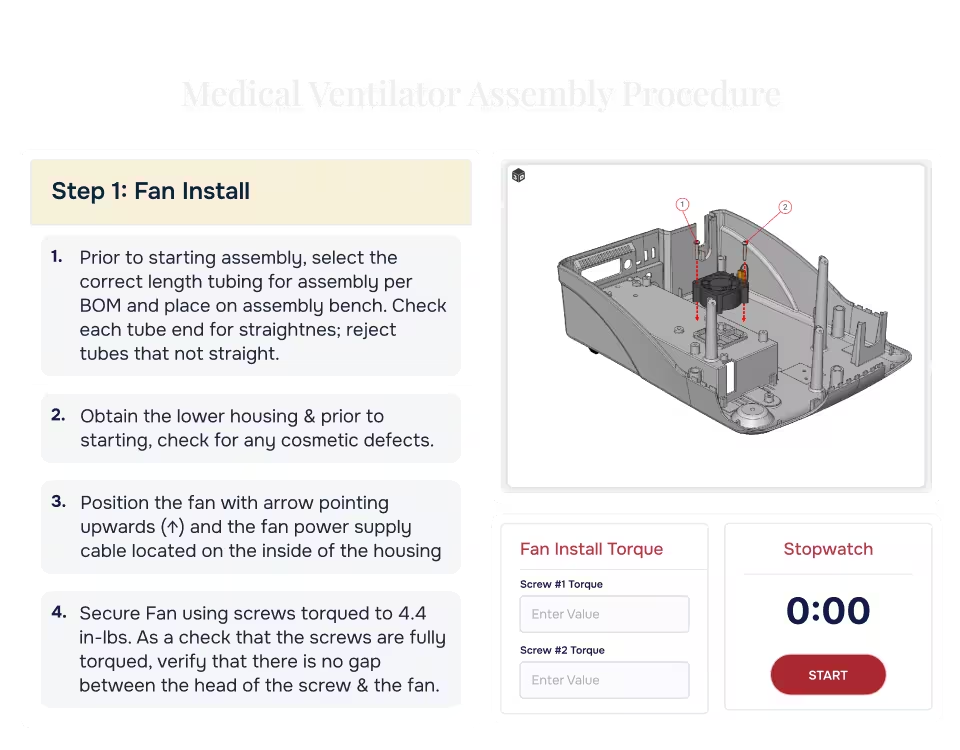
Publish as polished static documents in raster, vector, or PDF for offline distribution. Paired with the Visual Execution Platform, the same content also delivers as interactive instructions to workers, with live 3D, animations, and data capture. Same source, different output paths.

Start Authoring
$167/month
Arrow
Start Authoring
[ Benefits ]

What changes when authoring stops being the bottleneck.

From source to instruction in minutes.

Whether you start with CAD, video, or legacy PDFs, Evie AI accelerates every authoring task. A 50-part assembly that took 2 days now takes less than an hour. A 200-page service manual becomes a structured instruction in minutes. Engineering change incorporation that used to require hours of manual updates across dozens of documents now takes minutes.

Knowledge captured, not lost.

When experienced operators retire, their expertise walks out the door. Envision Creator captures that knowledge into durable, reusable assets. Your team's accumulated wisdom becomes a permanent, searchable library accessible to every shift.

Instructions that stay current.

When engineering issues a change, the PLM system identifies which instructions are impacted. You bring the updated CAD into Canvas Envision and run the update. Evie helps revise callouts, step text, exploded views, and animations. The current instruction reaches the floor immediately, with no manual rework or version confusion.

[ Features ]

Every authoring capability in one workspace.

Multi-source, multi-media authoring

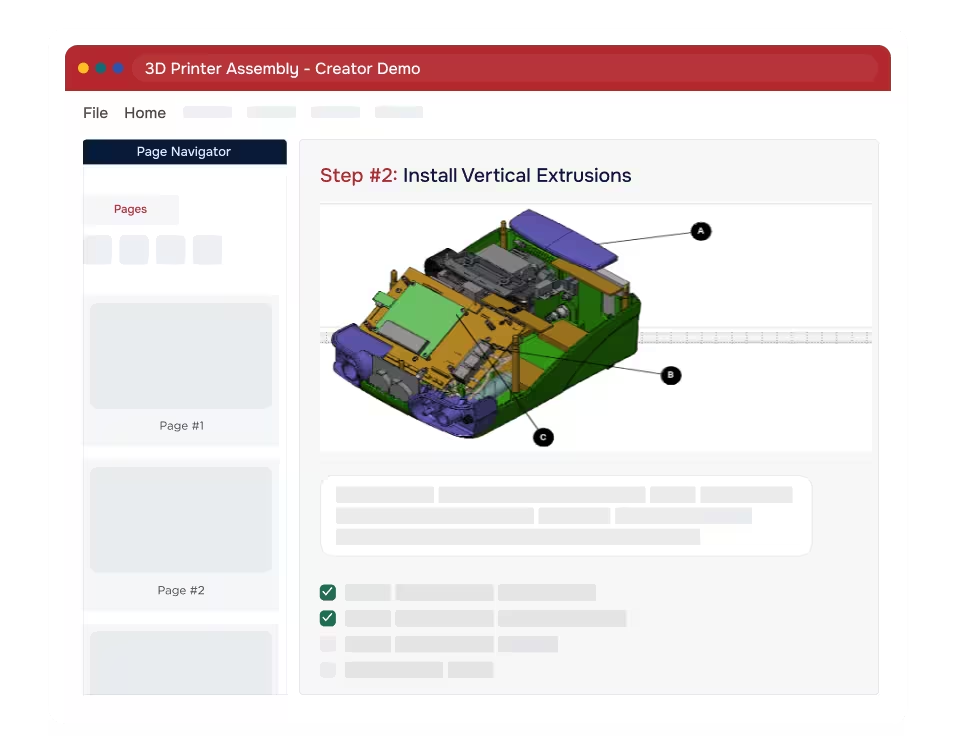
Envision Creator blends 3D models, 2D drawings, images, video, audio, text, and tables in a single workspace. Use what you have today to be immediately productive. Enrich the content over time as you add 3D models or embed video.

Interactive elements when delivered on-platform

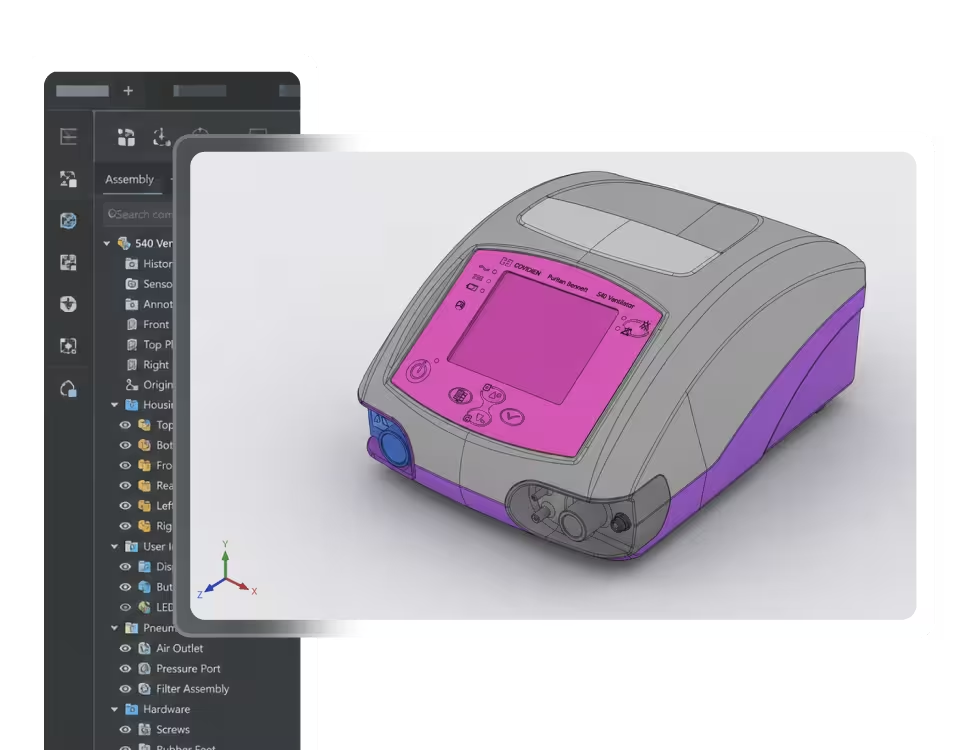
Authors work directly on a secure, lightweight version of the geometry to create animation sequences, exploded views, cutting planes, labels, callouts, and dimensions, with everything needed to document and describe engineering intent. The 3D content stays interactive, so workers can rotate, zoom, and isolate parts as they follow the procedure. When delivered on the Visual Execution Platform, the authored elements stay live and interactive for the worker. In static output, the same setups export as views, frames, and animated videos for offline distribution.

Templates with built-in AI prompts

Reusable templates with structured Text and Content layouts hold images, 3D, video, PDFs, vectors, and gadgets. Attach AI Layout Prompts directly to layout objects to define what content belongs there, and Evie generates against those prompts when authoring. The Templates Center manages every template as a governed asset through a Draft, Review, Published, and Archived lifecycle. The result is one set of guardrails for authors and Evie alike, with on-brand, consistent content from the first draft.

Author directly on the 3D model

Authors work directly on a secure, lightweight version of the geometry to create animation sequences, exploded views, cutting planes, labels, callouts, and dimensions, with everything needed to document and describe engineering intent. The 3D content stays interactive, so workers can rotate, zoom, and isolate parts as they follow the procedure. When delivered on the Visual Execution Platform, the authored elements stay live and interactive for the worker. In static output, the same setups export as views, frames, and animated videos for offline distribution.

Flexible output for any audience

Publish as polished page-based documents when you need a better PDF. Or deliver step-by-step interactive instructions on the Visual Execution Platform. Tailor the same content for different audiences — author once, adapt for any audience.

Associative updates when CAD changes

When engineering updates a design, you can bring new the new CAD data into Envision Creator and update your instructions. The geometry refreshes across instructions. Evie helps you process new components and sequence changes. Paired with Envision Connector, you can automate this process by connecting to your PLM system.

Build a better doc, faster and connected

Even when the output is a static instruction, Envision Creator's value over Word, PowerPoint, or generic illustration tools is that the source content is structured and connected to engineering. When the design changes, the static document is regenerated quickly instead of rebuilt from scratch.

Authoring automation via the Create SDK

For customers who need authoring automation beyond what the Envision Creator UI offers, the Envision Create SDK is available. Evie itself is trained on the Envision Create SDK, which is why Evie can drive authoring as deeply as it does. Customers can also use the Envision Create SDK directly for their own authoring extensions.

[ Time Savings ]

What used to take hours now takes minutes.

Task

TRADITIONAL
WITH EVIE

Convert 20-page PDF manual

6 hours
<10 minutes

Create 50-part assembly instruction

2 days
Under an hour

Generate exploded views with labels

25 minutes
30 seconds

Update header templates across 100 docs

30 minutes
10 seconds

OBSERVED BENCHMARKS WHERE MEASURED, NOT PROMISES. YOUR NUMBERS WILL DEPEND ON THE SOURCE CONTENT.

[ customer story ]
Zipline Autonomous delivery drones logo

Zipline authors every drone configuration directly from CAD.

Zipline builds production documentation for autonomous delivery drones in Envision Creator. Capturing CAD screenshots and drawings manually for a single drone configuration is days of work. With Envision Creator, Zipline authors directly from 3D CAD data. When a new configuration arrives, they duplicate the instruction set, update the CAD, and cascade those changes into the next document set in minutes. Every configuration covered, always current.

See more success stories
Arrow
See more success stories
Days → Minutes

Zipline success story

White Zipline drone with four propellers flying against a blue sky at sunset.
[ FAQs ]

Frequently Asked Questions.

Still wondering? We're happy to talk through your specific assembly use case.

Start Authoring
$167/month
Start Authoring

What CAD formats does Envision Creator support?

SolidWorks, Creo/Pro-E, CATIA, NX, Inventor, STEP, JT, and more. Full format list in the documentation.

Do I need 3D CAD models to get started?

No. Envision Creator works with PDFs, images, videos, and text. You do not need 3D models to author professional work instructions. When you do bring in 3D, the geometry becomes the basis for views, exploded assemblies, and animations. Those become live interactive content when delivered through Envision Operator on the Visual Execution Platform, or export as static views and videos for offline distribution.

How does Evie AI help with authoring?

Evie, Canvas Envision’s AI assistant, accelerates every step. Evie AI Agents convert PDFs, videos, and 3D assemblies into structured instructions in minutes. Inside Envision Creator, Evie helps with batch operations, complex 3D work (auto-labeling parts, creating exploded views, animating sequences), and instant feature guidance. Authors review, refine, and approve.

Can I produce static PDFs and graphics, or only interactive instructions?

Both. Envision Creator publishes as raster, vector, or PDF for offline distribution AND delivers interactive on-platform instructions when paired with the rest of the Visual Execution Platform.

How does Envision Creator stay current when engineering designs change?

The Product Lifecycle Management (PLM) system performs impact analysis and identifies which work instructions are affected. The author pulls the updated CAD into Envision Creator and runs the update. This can be automated by an Envision Connector. Evie helps revise callouts, step text, exploded views, and animations to track the change. The author reviews and approves before release.

How is Envision Creator different from X Pro?

X Pro is a desktop graphics and technical illustration product, maintained for the existing customer base. Envision Creator is the modern visual execution platform’s authoring environment. For any new project, the answer is Envision Creator. See the X Pro page for more product details.

How long does it take to learn?

Most teams are authoring their first work instructions within a day. If you know how to use PowerPoint, you can quickly learn Envision Creator.

[ Explore further ]

The rest of the platform.

Canvas Operator SDK icon

Interactive on-device delivery to the people doing the work.

Canvas Envision Connector icon

APIs, webhooks, and developer tools to extend the platform.

Canvas Envision Evie icon

Canvas Envision's AI for manufacturing work instructions.

Canvas Envision SDK icon

Pre-built PLM and MES integrations: Aras, Autodesk Vault, Infor, SSI Shipbuilding PLM, SAIC ReadyOne, 42Q, Rockwell Plex.

See your engineering data become visual work instructions.

Start authoring today for $167 per author per month, or request a demo with your own CAD data. Most teams are authoring in minutes.

START AUTHORING
$167/MONTH
Arrow
START AUTHORING
See it in action
See it in action