
<

Three SDKs that turn Canvas Envision into a true platform.

Envision SDK is the developer surface for manufacturing system integration, authoring automation, and embedded delivery on the Visual Execution Platform. The pre-built Envision Connectors are built on the same SDK you use.

Request a Demo
Arrow
Request a Demo
Get Developer Access
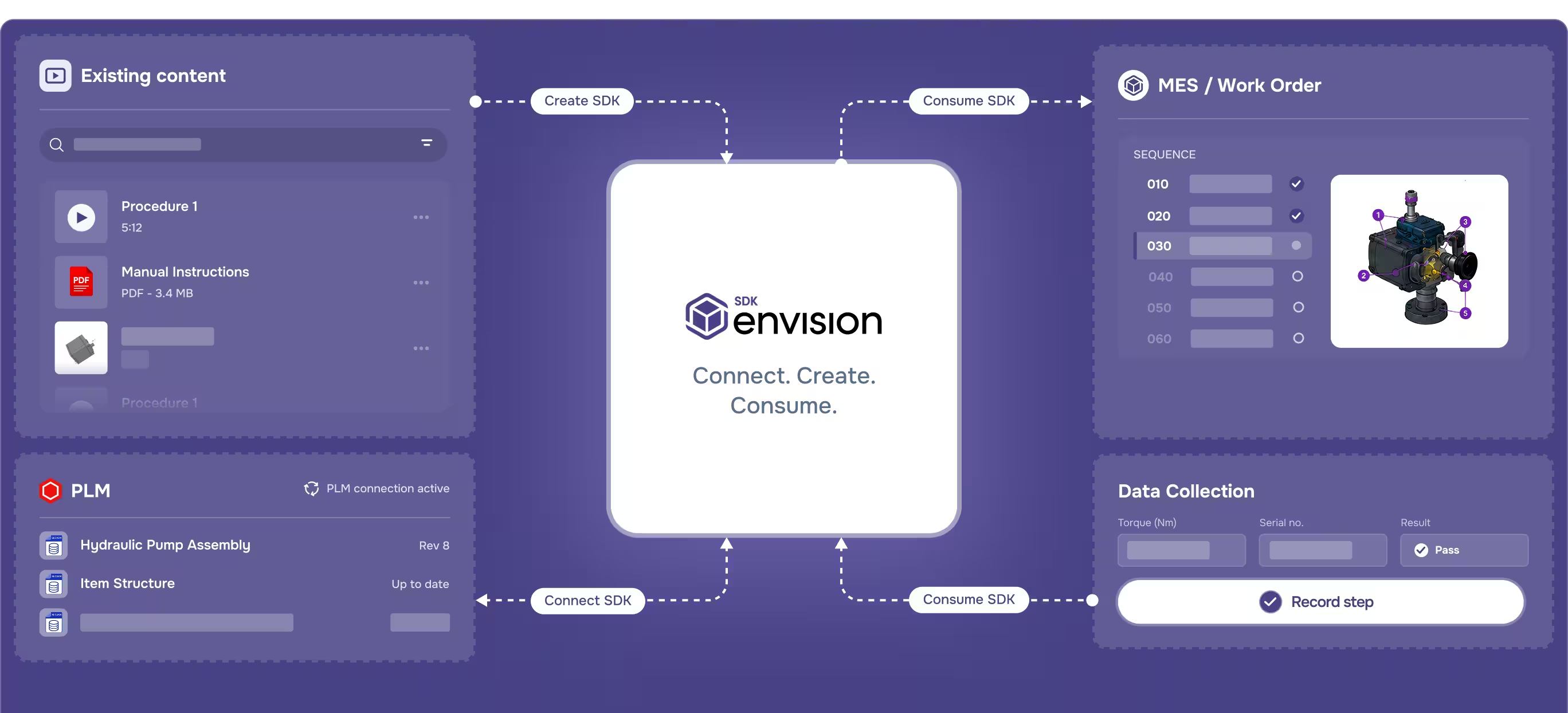
Diagram showing Envision SDK connecting existing content, MES work order, PLM, and data collection modules.
[ TRUSTED BY WORLD-CLASS MANUFACTURERS ]
Zipline
Marvin Engineering Company logo
Azenta Life Sciences
Otis
[ Why Envision Connector ]

Build on the platform the same way we do.

Envision SDK is the developer surface beneath the standard product. The pre-built Envision Connectors run on it, and Evie’s authoring sub-agents are trained on it. You use it to build your own integrations, authoring automations, custom gadgets, and embedded experiences, extending the platform the same way Canvas Envision builds it.

[ How It Works ]

Connect, create, consume.

Step [01]

Connect

Envision Connect SDK is the pathway for integrating Canvas Envision with engineering and Product Lifecycle Management (PLM) systems. The pre-built Envision Connectors for PLM are built on Envision Connect SDK. You use the same SDK to build your own integrations to PLM systems where a pre-built connector doesn’t already exist.

Step [02]

Create

Envision Create SDK is the pathway for automating authoring inside Envision Creator. Build custom commands, batch operations, programmatic content generation, and modal workflows. Evie’s authoring sub-agents are trained on Envision Create SDK, so AI-driven automation and your own custom automation share the same surface.

Step [03]

Consume

Envision Consume SDK is the pathway for Manufacturing Execution System (MES) integrations and embedded delivery of Envision Operator. The pre-built Envision Connectors for MES are built on Envision Consume SDK. You use the same SDK to build your own MES integrations or embed Envision Operator into other applications.

Get Developer Access
Arrow
Get Developer Access
[ Benefits ]

Complete coverage, familiar standards, production-tested.

Complete coverage across integration, authoring, and delivery

Three sub-SDKs cover the full developer surface beneath Canvas Envision. Envision Connect SDK handles PLM integrations, Envision Create SDK handles authoring automations and content generation, and Envision Consume SDK handles MES integrations and embedded delivery. Whatever you need to integrate, automate, or embed, the developer surface is there for it.

Standard patterns your team already knows

Envision SDK uses authenticated REST APIs, OAuth 2.0, API tokens, and webhooks, all standards your developers already know. Versioning, backward compatibility, and deprecation policies respect manufacturing systems’ long lifecycles.

Production-tested by Canvas Envision

The pre-built Envision Connectors are built on Envision SDK, and Evie’s authoring sub-agents are trained on it. Your extensions run on the same surface Canvas Envision uses internally, exercised in production every day.

[ Features ]

Every developer capability across the platform.

Manufacturing system integration

The pre-build Envision Connectors are built on the same Envision SDK that you can deploy into your environment.

Custom commands and authoring capabilities

The Envision Create SDK enables custom commands that guide authors through selections, modal windows, and structured workflows inside Envision Creator. This goes beyond templates into full custom authoring extensions.

Custom gadgets for instructions

Build interactive elements within instructions: custom data capture fields, measurement tools, inspection forms, approval workflows, and specialized UI components. Gadgets extend the instruction experience for organization-specific workflows.

Programmatic content generation

The Envision Create SDK enables programmatic content creation and updating. Build automations that generate or update instructions from external data sources, reducing manual authoring effort at scale.

Embedded Envision Operator experiences

The Envision Consume SDK lets you embed Envision Operator into other applications, drive it remotely via webhooks, and event-connect it with shop-floor systems.

Event-driven webhooks

Webhooks are the primary mechanism for communication between Canvas Envision and connected systems. When events occur within instructions, webhooks communicate that information to any connected system, with event-driven delivery instead of polling or batch.

REST API architecture

Envision SDK exposes authenticated REST APIs for reading, writing, and managing Canvas Envision data programmatically. The patterns are standard JSON over HTTPS that technical teams already know.

Authentication

Service accounts, OAuth 2.0, and API tokens are all supported. Credentials are stored in encrypted vaults with minimum required permissions. See the Security page for the deeper architecture.

Versioning and stability

Manufacturing systems have long lifecycles that require stable API contracts. Envision SDK follows standard API governance patterns for versioning, backward compatibility, and deprecation policies.

Sandbox & developer access

A sandbox environment is available for developers building on the Envision SDK. Access is coordinated through customer success.

[ customer story ]
Carnaud Metalbox Engineering logo

CMbE runs governed work instructions generated automatically from their PLM.

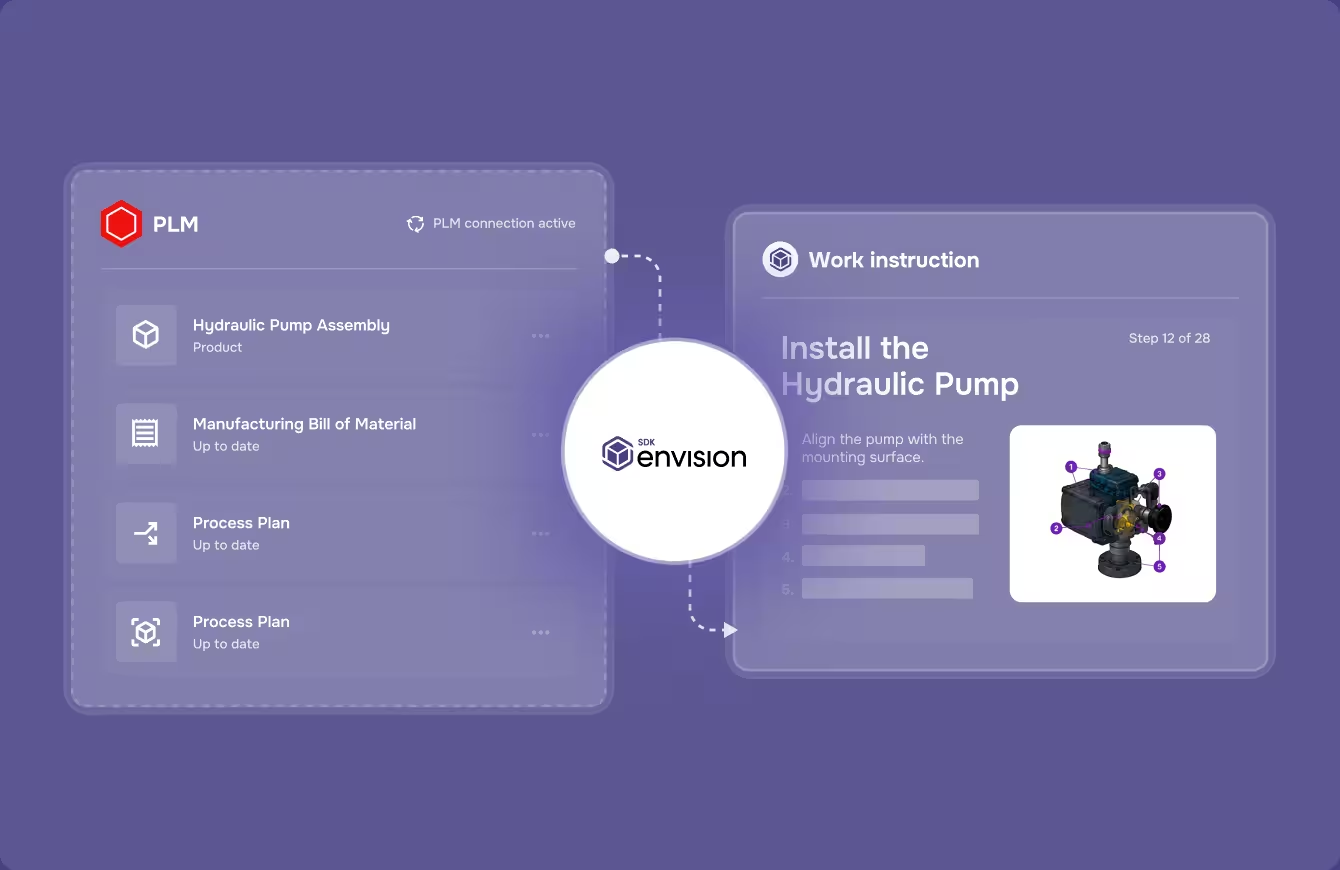
CMbE runs Envision Connector with Aras Innovator and Manufacturing Process Planning. The manufacturing process plan in Aras drives automatic generation of governed work instructions in Envision Creator, flowing directly into the assembly line. Instead of recreating documentation, authors validate and approve content that’s already current with engineering. The result on the line is fewer errors, faster builds, and lower scrap.

See more success stories
Arrow
See more success stories
Diagram showing PLM data and work instruction to install a hydraulic pump with an image of the pump.
[ FAQs ]

Frequently Asked Questions.

Still wondering? We're happy to talk through your specific assembly use case.

Contact Us
Contact Us

What is the Envision SDK and what can I build with it?

APIs, webhooks, and developer tools across three sub-SDKs (Connect, Create, Consume). You can build custom PLM and MES integrations, authoring automations, custom commands and gadgets, programmatic content generation, and embedded Envision Operator experiences in other applications.

Does Envision SDK support manufacturing system integration?

Yes. Connect SDK builds custom PLM integrations (Aras, Autodesk Vault, Infor, SSI Shipbuilding, and SAIC ReadyOne are pre-built). Consume SDK builds custom MES integrations (42Q and Rockwell Plex are pre-built). Both can connect to any system that exposes an API, including quality systems, content management, and custom enterprise applications.

How does Evie use the Envision Create SDK?

Evie’s sub-agents that drive authoring are trained on the Envision Create SDK. Evie uses the SDK to drive batch changes, content generation, and agent workflows. The relationship runs one direction: Evie uses the SDK; the SDK does not call Evie.

How are Envision SDK API calls authenticated?

OAuth 2.0, service accounts, and API tokens. See the Security page.

How do webhooks work?

Webhooks are the primary event mechanism. When events occur, Envision posts to your endpoint with a signed payload.

Are the pre-built Envision Connectors built on this same Envision Connect SDK?

Yes. The pre-built Envision Connectors run on Consume SDK, with Connect SDK on the PLM side and Consume SDK on the MES side. Some are built and maintained by Canvas Envision, others by the integration partner whose system they connect to. You can use the same SDKs for your own integrations.

Can I integrate with a system that doesn’t have a pre-built Connector?

Yes. The Connect SDK enables custom integrations with any system that exposes an API. Use Connect SDK for engineering / PLM-side integrations, Consume SDK for MES-side and embedded delivery.

Is there developer documentation?

Developer documentation is available through customer success.

Can I build commercial applications for resale on the Envision SDK?

Commercial application development for resale requires a separate licensing agreement. Talk to sales.

[ Explore further ]

The rest of the platform.

Canvas Operator SDK icon

Interactive on-device delivery to the people doing the work.

Canvas Envision Creator icon

Author the instructions Envision Operator delivers.

Canvas Envision Connector icon

APIs, webhooks, and developer tools to extend the platform.

Canvas Envision Evie icon

Canvas Envision's AI for manufacturing work instructions.

Build on the Visual Execution Platform.

Request a demo to see what your team could build. Or talk to us about developer access.

Get Developer Access
Arrow
Get Developer Access